Remove Stuff From Photos Effortlessly with AI

Choose Your AI Cleanup Tool
Match the right removal filter to your photo challenge. From quick touch-ups to full object erasure, we have a tool for every cleanup task.
Why Remove Stuff From Photos with beyo
Our AI cleanup tool understands context, texture, and lighting to deliver invisible results. Here is what makes it the best object remover for your phone.

Precise Object Detection
The AI detects edges and subjects accurately, so you can remove people, cars, wires, or clutter without leaving smudges or blurry patches. Just brush over the target area and watch it disappear.
Precise Object Detection
The AI detects edges and subjects accurately, so you can remove people, cars, wires, or clutter without leaving smudges or blurry patches. Just brush over the target area and watch it disappear.

Natural Background Filling
Removing stuff from photos is not just about deleting pixels. Beyo intelligently reconstructs the background using surrounding patterns, lighting, and colors. The result is a seamless patch that looks completely original.
Natural Background Filling
Removing stuff from photos is not just about deleting pixels. Beyo intelligently reconstructs the background using surrounding patterns, lighting, and colors. The result is a seamless patch that looks completely original.
One-Tap Cleanup Presets
No manual editing needed. Choose from specialized presets for common tasks like removing blemishes, text overlays, shadows, or photobombers. The AI applies the best cleanup logic automatically.
One-Tap Cleanup Presets
No manual editing needed. Choose from specialized presets for common tasks like removing blemishes, text overlays, shadows, or photobombers. The AI applies the best cleanup logic automatically.
What Can You Remove From Photos
From tiny blemishes to large objects, beyo handles a wide range of photo cleanup tasks. Here are a few popular scenarios.
Photobombers and Strangers
Erase people who accidentally walked into your frame. The AI identifies silhouettes and fills the space with the scene behind them.
Clutter and Trash
Delete trash cans, power lines, stray papers, and other visual noise that ruins an otherwise perfect composition.

Text and Watermarks
Need to remove text, logos, or watermarks from an image? The AI reconstructs the underlying texture cleanly.
How to Remove Stuff From Photos
Remove unwanted objects, people, or text in just a few simple steps using the beyo app.

Step 01.
Download the beyo app from Google Play and open it on your phone. No account setup required for basic cleanup.

Step 02.
Upload the photo you want to fix. Use the brush tool to paint over the stuff you want to remove. You can adjust the brush size for precision.
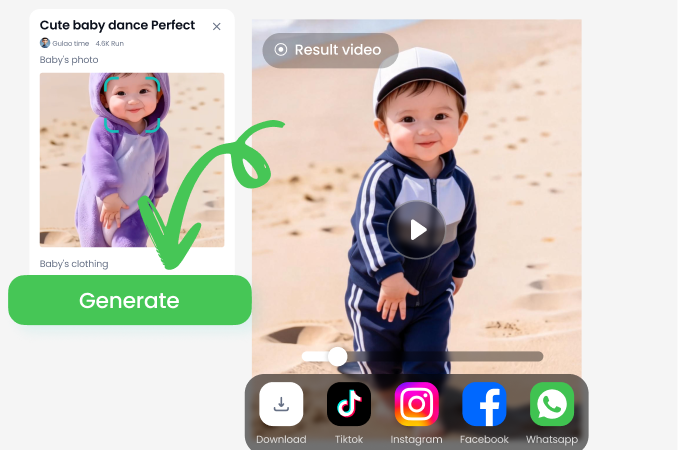
Step 03.
Tap Generate. The AI processes the area and fills it naturally. Download the clean image or share it directly to social media.
Real Results from AI Photo Cleanup
See how beyo removes unwanted stuff from photos while keeping the scene looking natural. These examples show the power of intelligent background filling.





Why Choose beyo for AI Photo Cleanup
beyo combines powerful AI removal technology with an intuitive mobile interface. No desktop software, no complex layer masks, no cost per export.
Clean Photos Without the Learning Curve
Traditional photo editors require years of practice to use the clone stamp or healing brush correctly. Beyo replaces that complexity with one-tap AI. You just apply the cleanup filter and the app handles edge detection, texture matching, and color grading. It is the fastest way to get clean, professional-looking images on your phone. Whether you are a social media creator, a small business owner, or just someone who wants to fix a family photo, beyo gives you the power to erase distractions and preserve the moments that matter.
Who Uses AI to Remove Stuff From Photos
Maya Chen
I post travel photos every week. Beyo helps me erase tourists and trash from my shots so my feed looks like I had every location to myself. It saves me hours of editing.
Derrick Nkosi
I sell products online. Removing the old background distractions and unwanted labels from my listing photos has directly improved my click-through rate. The AI filling is seamless.
Sofia Alvarez
Kids are unpredictable. A toy on the floor or a messy corner often ruins a perfect moment. With beyo, I just brush over the mess and the photo looks like it was taken in a clean room.
Liam O'Brien
I shoot events and sometimes there are exit signs or speakers in the background. Removing them used to take 20 minutes per photo in Photoshop. Beyo does it in seconds on my phone.
Maya Chen
I post travel photos every week. Beyo helps me erase tourists and trash from my shots so my feed looks like I had every location to myself. It saves me hours of editing.
Derrick Nkosi
I sell products online. Removing the old background distractions and unwanted labels from my listing photos has directly improved my click-through rate. The AI filling is seamless.
Sofia Alvarez
Kids are unpredictable. A toy on the floor or a messy corner often ruins a perfect moment. With beyo, I just brush over the mess and the photo looks like it was taken in a clean room.
Liam O'Brien
I shoot events and sometimes there are exit signs or speakers in the background. Removing them used to take 20 minutes per photo in Photoshop. Beyo does it in seconds on my phone.
Frequently Asked Questions About Removing Stuff From Photos
Find clear answers to common questions about using AI to clean up your images and remove unwanted objects.
Ready to Remove Unwanted Stuff From Your Photos?
Download the beyo app today and get clean, professional images in seconds. Your memories deserve to be free of distractions.

Ready to Remove Unwanted Stuff From Your Photos?
Download the beyo app today and get clean, professional images in seconds. Your memories deserve to be free of distractions.